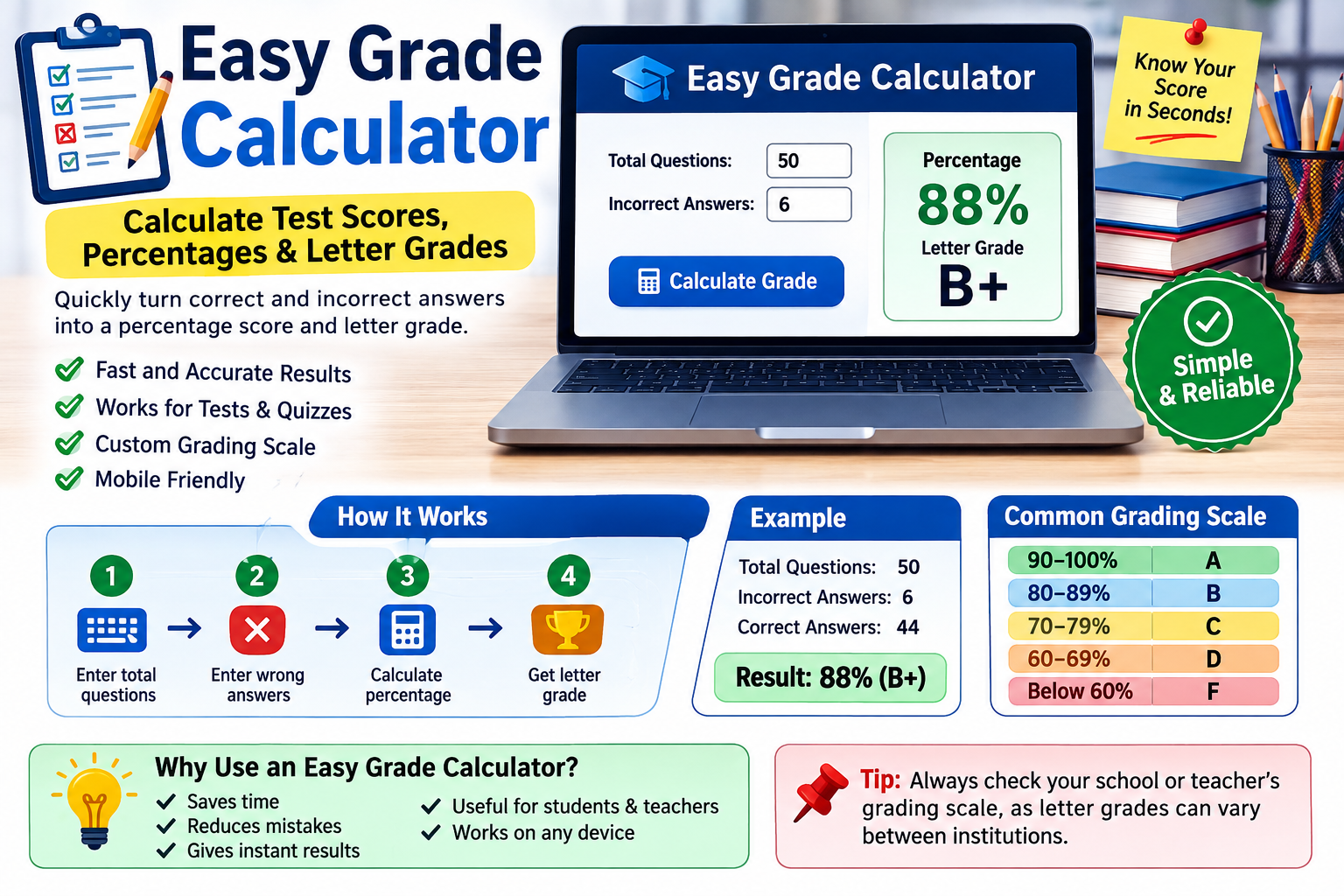
An easy grade calculator provides a quick way to turn the number of correct or incorrect answers into a percentage and, when supported, a letter grade.
Modern online easy grade calculators typically require only a few pieces of information, such as the total number of questions and the number of wrong answers. Some tools can also generate a complete grading chart, support custom grading scales, and work on phones, tablets, and desktop computers.
Whether you are checking a practice test, grading classroom quizzes, or simply trying to understand a score, an easy gradecalculator can save time and reduce repetitive arithmetic.
What Is an Easy Grade Calculator?
An easy grade calculator is an online tool designed to calculate the score of a test, quiz, or similar assessment. The most basic versions use the total number of questions and the number answered incorrectly to determine how many answers were correct and what percentage the student earned.
For example, if a test contains 40 questions and a student gets 36 correct, the calculator determines that the score is 90%. Depending on the selected grading scale, it may also display the corresponding letter grade.
Some current calculators are designed specifically for teachers and can generate a complete grading scale for a test. Instead of calculating each possible score manually, the teacher can enter the total number of questions and see the percentage and letter grade associated with different numbers of incorrect answers.
The concept is similar to the traditional EZ Grader, which was commonly used as a physical grading wheel or chart. Online versions make the same process faster and easier to access.
How Does an Easy Grade Calculator Work?
The calculation behind an easy grade calculator is straightforward. It compares the number of correct answers with the total number of questions.
The basic formula is:
Percentage = (Correct Answers ÷ Total Questions) × 100
If you know the number of wrong answers instead, you can first subtract the wrong answers from the total:
Correct Answers = Total Questions − Wrong Answers
For example, consider a 25-question quiz where a student misses 3 questions.
- Total questions: 25
- Wrong answers: 3
- Correct answers: 22
- Percentage: 22 ÷ 25 × 100
- Final percentage: 88%
Some online calculators use this same calculation automatically, so users do not need to perform the formula themselves.
How to Use an Grade Calculator
Most easy grade calculators are designed to require only a few steps.
1. Enter the Total Number of Questions
Start by entering the number of questions on the test or quiz. If the assessment has 50 questions, enter 50.
The total matters because every incorrect answer represents a different percentage depending on the size of the assessment.
2. Enter the Number of Wrong Answers
Next, enter the number of questions answered incorrectly. Some calculators allow you to enter correct answers instead, while others can work with points earned or points lost.
3. Select a Grading Scale
If the calculator offers grading-scale options, select the scale used by your school or teacher. Some current tools allow users to customize the cutoff for A, B, C, and other grades.
4. Calculate the Grade
Click the calculate button or enter the information into the interactive calculator. The tool can then display the percentage and, depending on its features, the letter grade.
5. Review the Result
Before using the result as an official grade, make sure the inputs and grading scale are correct. A calculator can perform the mathematics accurately, but it cannot automatically know every school’s grading policy.
Easy Grade Calculator Example
Suppose a student takes a 50-question test and answers 45 questions correctly.
The calculation is:
45 ÷ 50 × 100 = 90%
The student’s percentage is therefore 90%.
If the applicable grading scale considers 90% an A, the result would be an A. However, schools and teachers can use different grading boundaries, so the percentage should be checked against the appropriate grading policy.
Here is another simple example:
| Total Questions | Wrong Answers | Correct Answers | Percentage |
| 20 | 0 | 20 | 100% |
| 20 | 1 | 19 | 95% |
| 20 | 2 | 18 | 90% |
| 20 | 3 | 17 | 85% |
| 20 | 4 | 16 | 80% |
| 20 | 5 | 15 | 75% |
This also shows why the number of questions affects the impact of each mistake. On a 20-question test, one wrong answer changes the score by five percentage points.
Easy Grade Calculator for Tests and Quizzes
One of the most common uses of an calculator is scoring tests and quizzes.
Teachers who grade multiple-choice assessments may need to perform the same calculation many times. A calculator can simplify this process by converting the number of mistakes into a percentage immediately.
For students, the tool can be useful after completing a practice test. Instead of manually calculating the percentage, they can enter the total questions and mistakes and quickly see their result.
Some online tools can also generate a complete grading table showing the number wrong, number right, percentage, and letter grade for every possible score.
Easy Grade Calculator for Teachers
Teachers can benefit from an easy calculator when grading large numbers of similar assessments.
Instead of repeatedly calculating percentages by hand, a teacher can use a grading chart or calculator to quickly identify the score for each paper.
For example, a calculator that generates a full grading scale can show how many questions a student can miss while still achieving an A, B, C, or another target grade. Some current tools support assessments with hundreds of questions and provide complete score tables.
This can make routine grading faster and reduce simple arithmetic errors.
Easy Grade Calculator for Students
Students can use an easy calculator for several purposes.
A student may want to check a practice exam, calculate a quiz percentage, or understand how many questions they need to answer correctly to reach a particular score.
For example, if a student knows that a test has 40 questions, they can use a grading chart to see the percentage associated with different numbers of correct answers.
This can also help students understand their performance more clearly. Rather than simply seeing that they missed five questions, they can see how those five mistakes translate into a percentage.
Easy Grade Calculator and Letter Grades
A percentage and a letter grade are related, but they are not always identical across schools.
A commonly used grading scale is:
- 90–100% = A
- 80–89% = B
- 70–79% = C
- 60–69% = D
- Below 60% = F
However, this is only an example. Some schools use plus and minus grades, while others use different percentage boundaries.
Modern easy grade calculators may allow users to change the grading thresholds or choose between different grading scales. This is useful because the same percentage can produce a different letter grade under another system.
For this reason, always check the grading scale used by your teacher, school, college, or university.
Easy Grade Calculator vs. Final Grade Calculator
An easy grade calculator and a final grade calculator serve different purposes.
An easy grade calculator generally focuses on one test, quiz, or assignment. You provide the total number of questions and correct or incorrect answers, and the tool calculates the score.
A final grade calculator, on the other hand, is designed to help determine an overall course grade or calculate the score needed on a final exam. It may require information about the current grade and the weight of the final exam.
For example, if your current course grade is 84% and your final exam is worth 30% of the course, a final grade calculator can help determine what exam score you need to reach a particular overall grade.
Therefore, an easy grade calculator is best for individual assessments, while a final grade calculator is more appropriate for course-level calculations.
Easy Grade Calculator vs. Weighted Grade Calculator
A weighted grade calculator is useful when different assignments contribute different amounts to the final course grade.
For example:
- Homework = 20%
- Quizzes = 20%
- Midterm = 25%
- Final exam = 35%
A basic easy grade calculator normally does not perform this type of calculation. It focuses on the raw score for one assessment.
If you need to calculate your overall class grade, choose a calculator that supports weighted categories rather than relying on a basic test-score calculator.
Benefits of Using an Easy Grade Calculator
An easy grade calculator offers several practical benefits.
Saves Time
It eliminates repetitive manual calculations, which can be especially useful when grading many tests.
Simple to Use
Most calculators require only the total number of questions and the number correct or wrong.
Reduces Arithmetic Errors
Automatic calculations can reduce mistakes caused by manual division or multiplication.
Provides Quick Results
The percentage can usually be displayed immediately after the required information is entered.
Useful on Different Devices
Many modern online calculators are responsive and can be used on desktops, tablets, and smartphones.
Supports Different Grading Systems
Some calculators allow custom grading thresholds, plus/minus grades, or multiple grading scales.
Common Mistakes to Avoid
Even though an easy grade calculator handles the mathematics, incorrect input can still produce an incorrect result.
Always check the total number of questions before calculating. Then make sure the number of wrong or correct answers has been counted accurately.
You should also verify whether the test includes bonus questions, partial credit, penalties, or other special rules. A simple question-based calculator may not account for these factors.
Another common mistake is assuming that every school uses the same letter-grade scale. The percentage may be correct while the letter grade is different under another grading policy.
Can an Easy Grade Calculator Work With Points?
Yes, depending on the calculator. Some tools allow users to treat total points as the maximum score and points lost as incorrect answers.
For example, if an assignment is worth 100 points and a student earns 86 points, the percentage is:
86 ÷ 100 × 100 = 86%
For a 50-point assignment where a student earns 43 points:
43 ÷ 50 × 100 = 86%
The same percentage calculation can work with points as long as the assessment is scored proportionally.
Frequently Asked Questions
What is an easy grade calculator?
An easy grade calculator is a tool that converts test, quiz, or assignment results into a percentage and sometimes a letter grade.
What formula does an easy grade calculator use?
The basic formula is correct answers divided by total questions, multiplied by 100.
Can I use an easy grade calculator for a quiz?
Yes. It is particularly useful for quizzes and tests where the grade is based on the number of correct answers.
Can an easy grade calculator show letter grades?
Many online versions can display letter grades, although the result depends on the grading scale selected.
Is an easy grade calculator the same as a weighted grade calculator?
No. An easy grade calculator generally calculates an individual assessment, while a weighted grade calculator combines grades that have different weights.
Can I use an easy grade calculator on my phone?
Many current online calculators are designed to work on mobile devices without requiring an app or download.
Conclusion
An easy grade calculator is a convenient way to calculate test, quiz, and assignment scores without doing repetitive mathematics manually. By entering the total number of questions and the number of correct or incorrect answers, users can quickly determine their percentage and, when supported, their letter grade.
The tool is useful for both teachers and students, especially when dealing with straightforward assessments. For weighted course grades or final-exam planning, however, a specialized calculator is usually a better choice.
Before accepting a letter grade, always check the grading scale used by your school or teacher. With the right inputs and grading policy, an easy grade calculator can make everyday grade calculations faster, simpler, and more convenient.