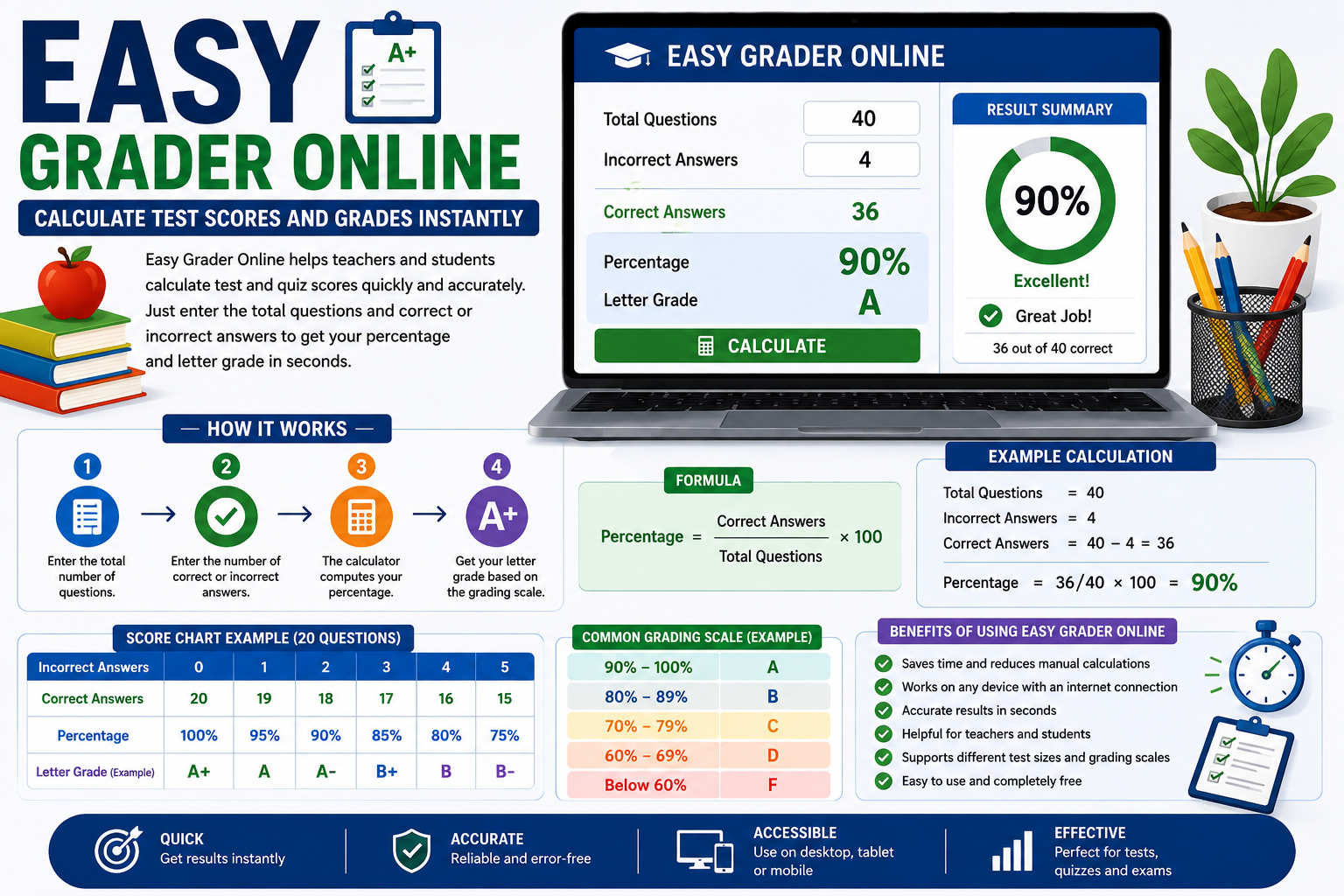
Easy Grader Online gives teachers and students a convenient way to calculate assessment scores in seconds.
Instead of repeatedly applying the same formula, users can enter basic test information and receive a percentage score. Depending on the calculator, the result may also include a letter grade or a complete grading chart.
Whether you are checking a classroom test, reviewing a practice quiz, or trying to understand how many questions you need to answer correctly, an online grader can make the process much easier.
What Is an Easy Grader Online?
An easy grader online is a web-based tool that helps calculate the score of a test, quiz, or similar assessment. It is generally designed for situations where the final score depends on the number of questions answered correctly.
For example, imagine a test contains 30 questions and a student answers 27 correctly. An online grader can quickly determine that the student’s score is 90%.
The basic calculation is:
Correct Answers ÷ Total Questions × 100 = Percentage
In this example:
27 ÷ 30 × 100 = 90%
Some online graders can also convert the percentage into a letter grade according to a selected grading scale.
The concept is similar to the traditional grading charts and physical EZ Grader tools that teachers have used to speed up test scoring. The online version simply brings the calculation into a browser, making it accessible from a computer, tablet, or smartphone.
How Does an Easy Grader Online Work?
The calculation behind an online grader is straightforward. It compares the number of points or questions earned with the total possible amount.
If a test has 50 questions and a student answers 42 correctly, the calculation would be:
42 ÷ 50 × 100 = 84%
If the user knows the number of incorrect answers instead, the correct answers can be found first.
For example:
- Total questions: 50
- Incorrect answers: 8
- Correct answers: 42
- Percentage: 84%
Some tools are designed around questions, while others allow users to enter points earned and total points. The underlying idea is the same: determine how much of the available score was earned.
How to Use an Easy Grader Online
Using an online grading calculator usually takes only a few moments.
Step 1: Determine the Total Questions
First, identify how many questions are included in the test or quiz. A test might have 10, 25, 50, or 100 questions.
The total is important because one incorrect answer has a different effect on a small test than on a large one.
Step 2: Count the Correct Answers
Count how many questions the student answered correctly. If the calculator asks for incorrect answers instead, simply count the questions that were missed.
For example, on a 40-question test, a student who misses four questions has 36 correct answers.
Step 3: Enter the Information
Enter the required numbers into the online calculator. Some tools may ask for correct answers, while others may ask for incorrect answers or points earned.
Step 4: Review the Percentage
The calculator processes the information and displays the percentage. In the example above:
36 ÷ 40 × 100 = 90%
Step 5: Check the Letter Grade
If the tool includes letter-grade conversion, it may display an A, B, C, or another grade based on the selected grading scale.
Always compare the result with the grading policy used by your school or teacher because grading systems are not identical everywhere.
Easy Grader Online Example
Let’s look at a simple 20-question quiz.
If a student gets all 20 questions correct, the result is 100%.
If the student misses one question, 19 are correct:
19 ÷ 20 × 100 = 95%
If the student misses four questions, 16 are correct:
16 ÷ 20 × 100 = 80%
A basic score chart would look like this:
| Correct Answers | Incorrect Answers | Score |
| 20 | 0 | 100% |
| 19 | 1 | 95% |
| 18 | 2 | 90% |
| 17 | 3 | 85% |
| 16 | 4 | 80% |
| 15 | 5 | 75% |
| 14 | 6 | 70% |
This illustrates an important point: the size of an assessment affects the value of each question. Missing one question on a 20-question quiz reduces the score by five percentage points, while missing one question on a 100-question test reduces it by only one percentage point.
Why Teachers Use an Easy Grader Online
Teachers often have to grade the same assessment for an entire class. When there are many students, even simple calculations can consume valuable time.
An online grader can help simplify this routine work. Instead of calculating every percentage manually, a teacher can quickly determine the score from the number of questions answered correctly.
An online grader can be particularly useful for:
- Multiple-choice tests
- Short classroom quizzes
- Practice assessments
- Review tests
- Standardized practice questions
- Large groups of similar assessments
Some tools can also produce a complete grading table. Once the total number of questions is entered, the teacher can see how different numbers of incorrect answers correspond to different percentages.
This can be helpful when checking papers quickly.
How Students Can Use an Easy Grader Online
Online grading tools are not limited to teachers. Students can also use them to understand their performance.
For example, after completing a practice test, a student may know that they answered 37 of 40 questions correctly. Instead of calculating the percentage manually, they can use an online grader to find the result immediately.
Students can use the calculator to:
- Check practice-test scores
- Calculate quiz percentages
- Understand the impact of missed questions
- Estimate a test grade
- Set performance targets
- Compare results between practice assessments
The tool can also help students understand what percentage they need to reach a particular target. For example, on a 50-question test, achieving 90% requires 45 correct answers.
However, students should remember that a test percentage is not necessarily the same as their overall course grade. A course may include homework, projects, participation, quizzes, and exams with different weights.
Easy Grader Online and Letter Grades
An online grader can calculate a percentage mathematically, but converting that percentage into a letter grade requires a grading scale.
One commonly used example is:
- 90–100% = A
- 80–89% = B
- 70–79% = C
- 60–69% = D
- Below 60% = F
This scale is only an example. A particular teacher, school, college, or university may use different boundaries.
Some grading systems also use grades such as A-, B+, B-, and C+. Therefore, users should not assume that one percentage always represents the same letter grade.
When an online grader allows a custom grading scale, users can enter the thresholds that apply to their particular class.
Easy Grader Online vs. Manual Calculation
There is nothing complicated about calculating a percentage manually. The formula is simple, and anyone with basic arithmetic skills can perform it.
The problem is repetition.
A teacher grading 30 or 40 tests may have to perform the same calculation dozens of times. An online grader can reduce this repetitive work.
Manual calculation:
- Count correct answers.
- Divide by total questions.
- Multiply by 100.
- Repeat for every student.
Online calculation:
- Enter the test information.
- Review the result.
The biggest benefit is therefore convenience and consistency rather than advanced mathematics.
Easy Grader Online vs. Weighted Grade Calculator
It is important to understand that an easy grader online is not designed for every type of academic calculation.
A basic online grader generally calculates the result of one assessment. A weighted grade calculator is designed for courses where different categories contribute different percentages to the final grade.
For example, a course might be structured like this:
- Assignments: 25%
- Quizzes: 15%
- Midterm: 25%
- Final exam: 35%
If you want to calculate the overall course grade, you need to consider the weight of each category. A basic Easy Grader is not designed for that type of calculation.
Use an online Easy Grader for individual tests and quizzes, and choose a weighted or final-grade calculator when you need to evaluate your complete course performance.
Benefits of Using an Easy Grader Online
An online grader offers several practical advantages.
Fast Calculations
The score can be calculated almost immediately after the required information is entered.
Simple Interface
Most basic graders do not require complicated instructions or advanced mathematical knowledge.
Convenient Access
Because the calculator operates online, it can be accessed from devices with an internet browser.
Reduced Arithmetic Work
Teachers and students do not have to repeatedly perform the same percentage calculation.
Useful for Different Tests
The same method can be used for small quizzes and larger tests.
Helpful for Score Checking
Students can verify their calculations, while teachers can quickly check grading results.
Potentially Customizable
Some online tools allow users to work with different grading scales or scoring methods, which can make them more suitable for different classroom requirements.
Common Mistakes to Avoid
An online calculator can only produce a useful result when the information entered is correct.
One common mistake is entering the wrong number of total questions. Another is miscounting the number of correct or incorrect answers.
Users should also check whether the assessment includes bonus questions, penalties, partial credit, or other special scoring rules. A basic grader may not account for these factors.
Another mistake is confusing a test percentage with an overall course grade. An 85% on one exam does not necessarily mean the student’s course grade is also 85%.
Finally, always verify the grading scale before interpreting a percentage as a letter grade.
Tips for Getting Accurate Results
For reliable calculations, follow a few simple practices:
- Count the total questions carefully.
- Verify the number of correct answers.
- Double-check incorrect answers before entering them.
- Use the correct grading scale.
- Consider bonus points or penalties.
- Do not use a basic grader for complicated weighted calculations.
- Review the final result before recording it as an official grade.
These steps help ensure that the calculator is being used correctly.
Frequently Asked Questions
What is an easy grader online?
An easy grader online is a web-based calculator that helps users determine test, quiz, or assessment scores from the number of questions or points earned.
Can an easy grader calculate percentages?
Yes. A typical grader calculates the percentage by comparing correct answers or points earned with the total possible score.
Can students use an easy grader online?
Yes. Students can use it to check practice tests, calculate quiz scores, and understand their assessment percentages.
Can teachers use an easy grader for multiple students?
Yes. It can make repetitive test-score calculations faster, especially when many students take the same assessment.
Does an easy grader automatically know my school’s grading scale?
Not necessarily. Some tools use a standard scale, while others allow users to choose or customize one. Always check the scale used by your school or teacher.
Is an easy grader online the same as a final grade calculator?
No. An Easy Grader generally focuses on an individual test or quiz, while a final grade calculator considers course grades and may include weighted categories or final-exam requirements.
Conclusion
An easy grader online provides a straightforward way to calculate test and quiz scores without repeatedly working through the percentage formula by hand. By entering basic information such as total questions and correct answers, teachers and students can quickly determine an assessment percentage.
The tool is particularly useful for routine tests, quizzes, and practice assessments. Teachers can use it to reduce repetitive grading work, while students can use it to check their performance and understand how missed questions affect their scores.
However, an online Easy Grader should not be confused with a weighted or final grade calculator. When assignments have different values or a course uses a complex grading system, a more advanced calculator may be necessary.
For straightforward assessment scoring, an Easy Grader Online can make grade calculations faster, simpler, and more convenient.